Howdy!

JamSocial

Leading networking for 100–500 people?

Jam Bingo 7
See how Jam Bingo works →
Jam BingoTemplatesTestimonialsOur Story
Create a Jam Bingo

Jam Bingo For All Programs Holiday Mixer

Help members from every chamber program get past small talk, with prompts for a 10-minute warm-up up to an hour of networking.

Attendees playing Jam Bingo at an event
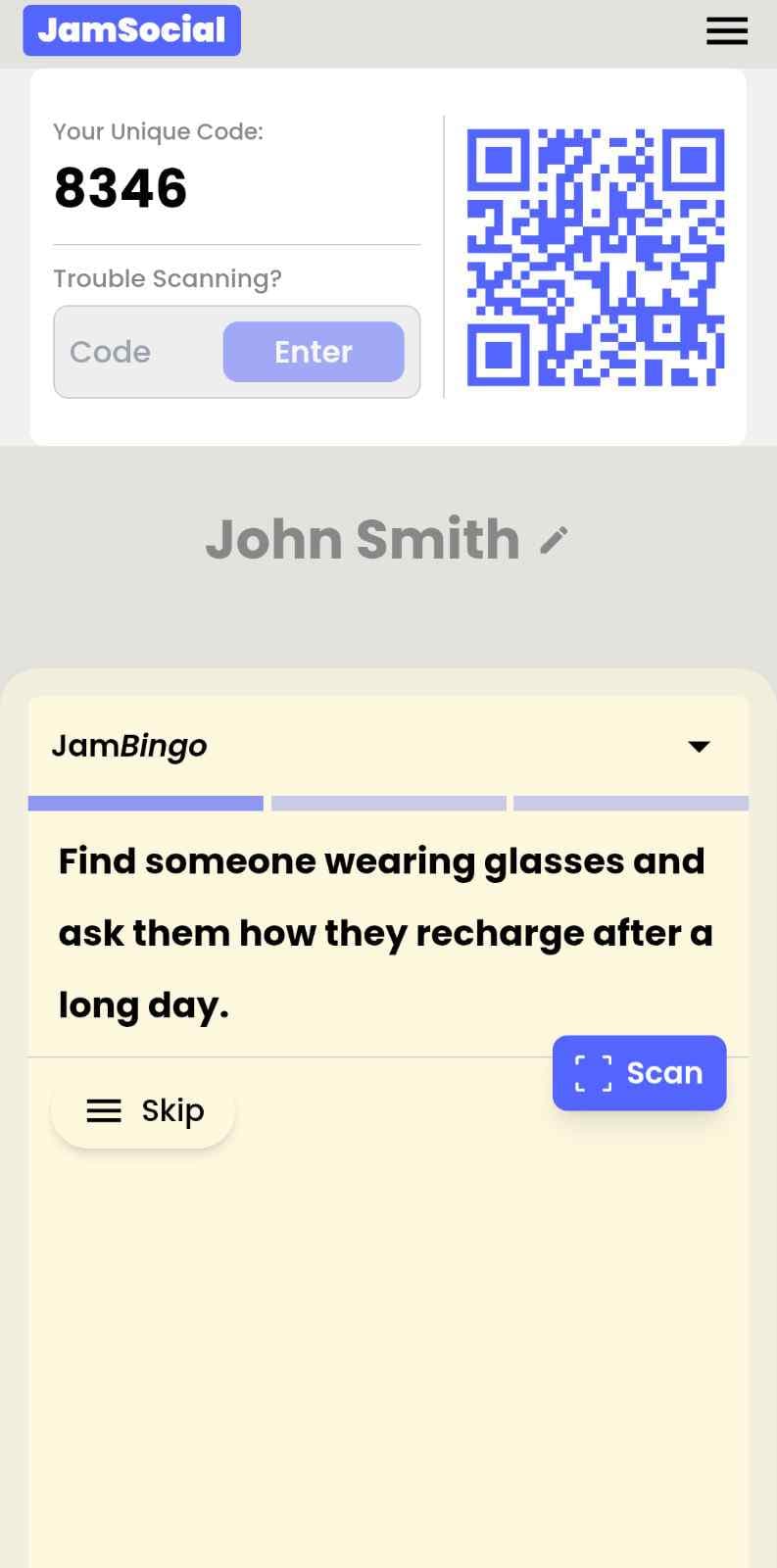
Jam Bingo on an attendee's phone: their own QR code and game code, a conversation prompt, and the Scan button
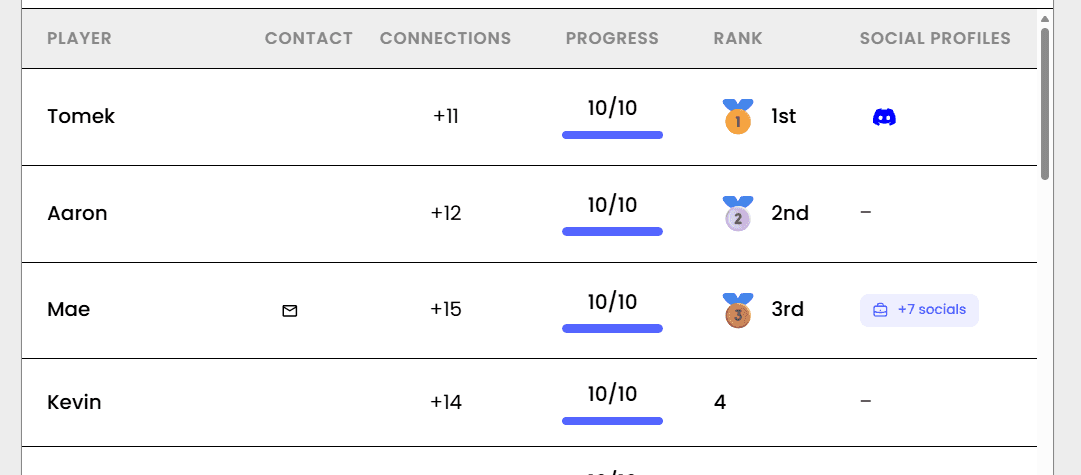
The Jam Bingo leaderboard showing who made the most connections
Prompts by session length

All Programs Holiday Mixer Prompts for Your Networking Time

Best for 10–15 Minutes

Quick and Light

6 prompts+

6 prompts. Fast, light-hearted prompts. People find a match, laugh, and move on.

Best for 25–35 Minutes

Questions That Get People Sharing

10 prompts+

10 prompts. Each prompt asks for a story, a tip, or an opinion.

Best for 40–60 Minutes

Conversation Starters

20 prompts+

20 prompts. Ask-and-challenge prompts for longer conversations people remember.

26 Jam Bingo Prompts

Scroll to explore

Click + to add it to your list for your own Jam Bingo.

1Find someone from a chamber program you're not part of
2Find a chamber ambassador and ask how long they've volunteered
3Find a new member who joined this year
4Find someone wearing a holiday sweater
5Find someone with a holiday tradition from another country
6Find a young professional and a long-time member and introduce them
7Ask someone what they get out of their chamber program
8Ask a new member what made them join the chamber
9Ask someone which chamber event was their favorite this year
10Ask someone about their favorite holiday tradition
11Ask a program leader what's coming up next year
12Ask someone what they're celebrating this season
13Ask someone which local spot they'd take a visitor during the holidays
14Ask someone how their business did this year in one word
15Ask someone what's on their holiday wish list for their business
16Ask someone which program they'd join next year
17Ask someone about a chamber connection that changed their year
18Challenge someone to name one person from another program they should meet
19Ask a long-time member how the chamber has changed over the years
20Ask someone what they're most grateful for this year
21Challenge a young professional and a long-time member to swap one piece of advice
22Ask someone what they want to do more of in 2027
23Ask someone about a holiday memory that still makes them laugh
24Ask someone what would make them more involved in the chamber
25Ask someone how they'd describe their year to a stranger
26Swap one goal for next year with someone and ask who here could help

Jam Bingo Instructions

  1. 1Scan the Jam Bingo QR code (or enter the game code).
  2. 2Prompts appear directly on your phone.
  3. 3Walk around and find someone to ask your prompt to.
  4. 4Scan their QR code to unlock the next prompt.
  5. 5Repeat, mingle, and have fun!
Live Action#JamSocial
Networking Moment
Group Interactive Bingo

Connect people naturally with Jam Bingo, the interactive networking activity!

What is Jam Bingo?

Jam Bingo turns awkward networking sessions into fun, interactive experiences. No printing cards or hunting for pens—attendees simply scan a QR code with their phone and jump straight into a game tailored to your event.

Paper Bingo

Old School
  • ✕High prep: print cutouts, bring pens & paper waste
  • ✕Identical static grids for every single attendee
  • ✕Awkward manual signatures & pen-hunting
  • ✕Easy to drop, crumble, or leave on tables
It's Free

Jam Bingo

Digital
  • ✓Easy to setup — Zero printing
  • ✓Dynamic personalized conversation prompts
  • ✓Leaderboard for awarding prizes
  • ✓Simple way to make the networking interactive

How?

Jam Bingo is the simplest networking game that gets everyone talking and learning more about each other.

Your browser does not support the video tag.

1. during the networking session

Introduce Jam Bingo to get attendees started.

Your browser does not support the video tag.

2. Attendees scan to participate

Guests open their phone camera and scan the QR Code.

Your browser does not support the video tag.

3. Everyone gets a conversation starter

Each guest receives a tailored conversation starter.

Your browser does not support the video tag.

4. How to unlock the next prompt

After chatting, scan the other person's QR Code to mark the connection and unlock your next prompt.

Your browser does not support the video tag.

5. Contact Exchange: share socials

(Optional) Attendees can add their LinkedIn, Email, or Website.

Your browser does not support the video tag.

6. Never lose track of people met

When the event ends, every player can review all their new connections in one spot.

Your browser does not support the video tag.

7. Get everyone talking naturally

Attendees approach each other, ask their prompt, and talk.

Updated: November 03, 2026

JamSocial

Explore
  • Home
  • Jam Bingo
  • Solutions
  • Testimonials
  • Templates
Login
  • Dashboard — For Organizers
  • App — For Attendees
  • Affiliates — For Partners
More
  • Our Blog
  • Our Story
  • Terms of Service
  • Privacy Policy
  • Conversation Starters
  • Networking Games
  • Tools
JamSocial

Make Your Networking Session Interactive

© 2026 JamSocial. All rights reserved.

Privacy PolicyTerms of Service