Virtual Speed Networking Bingo Icebreaker
Icebreaker for virtual events. Get people to actually connect with each other without the painful breakout room silence.

What Is a Virtual Speed Networking Bingo Icebreaker?
A virtual speed networking bingo icebreaker turns that awkward moment when everyone stares at their own face on Zoom into a game people actually want to play. Instead of the usual 'so where are you joining from' small talk, your attendees get conversation prompts like 'Find someone who has a hidden talent you would never guess' or 'Ask someone what they would do with a million dollars.' They hop into breakout rooms, find matches for their prompts, and suddenly your virtual event feels like a real party instead of a mandatory work meeting.
Here is the thing about virtual events. People are exhausted. They have been staring at screens all day. The last thing they want is another breakout room where everyone is terrified to speak first. The virtual speed networking bingo icebreaker changes all that. It gives everyone a clear mission and a built in conversation starter. When people know exactly why they are talking to someone, the awkwardness disappears. You stop being the person running a boring virtual event and start being the person who actually made remote connection work.
How?
Jam Bingo is the simplest networking game that gets everyone talking and learning more about each other.
1. during the networking session
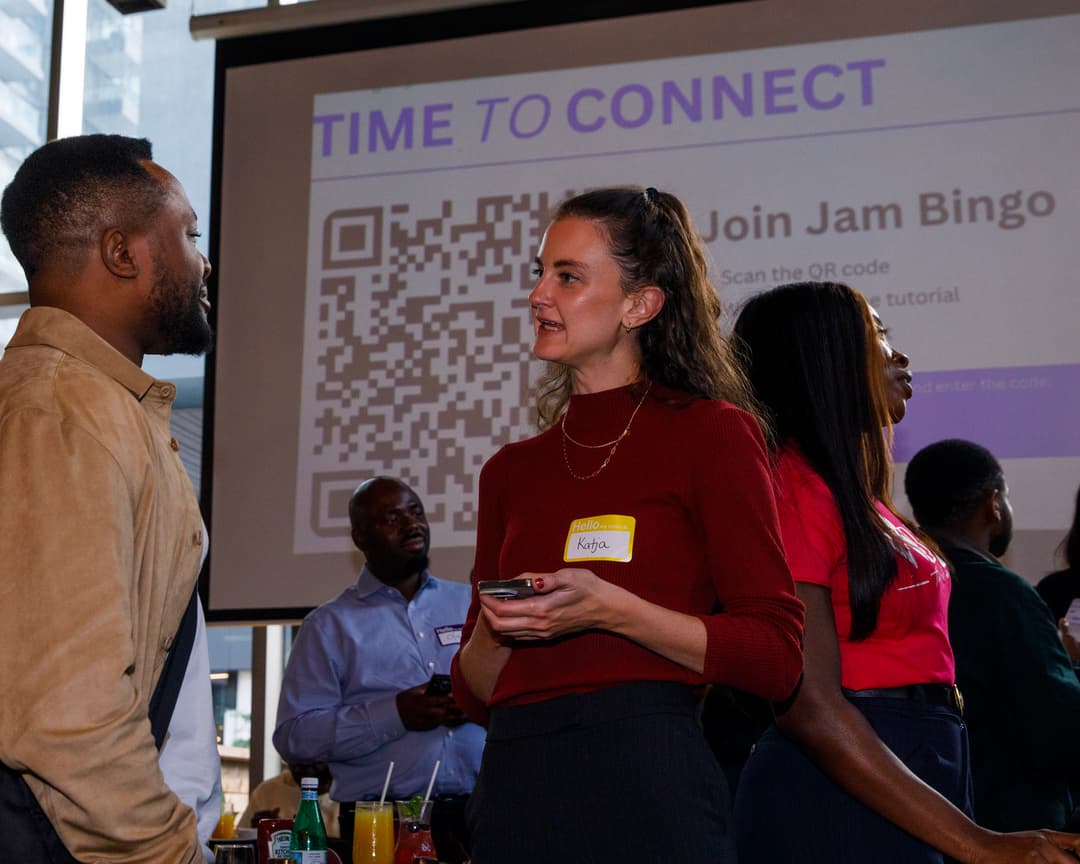
Introduce Jam Bingo to get attendees started.
2. Attendees scan to participate
Guests open their phone camera and scan the QR Code.
3. A conversation starter To Connect
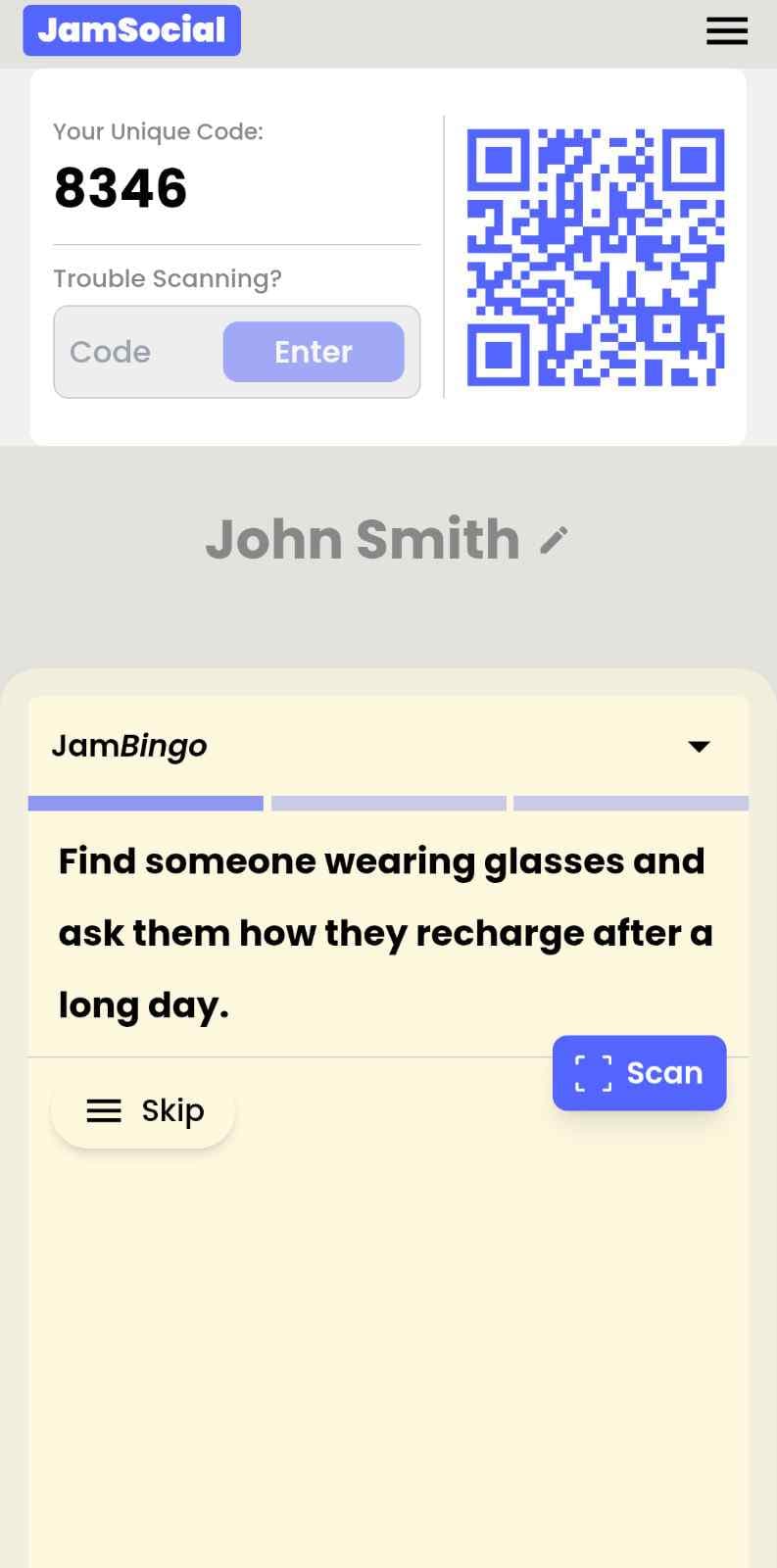
Each guest receives a tailored conversation starter.
4. The Exchange: Get People Talking
After chatting, scan the other person's QR Code to mark the connection and unlock your next prompt.
How to Use the Virtual Speed Networking Bingo Icebreaker at Your Event
The virtual speed networking bingo icebreaker helps the people at your event meet new people, not just the people they came with. Here’s how to use it:
- 01Step 1
Decide How Many New People Each Person Meets
Create a Jam Bingo for your event and choose how many different people you'd like each person to talk with. That's the job of the Virtual Speed Networking Bingo Icebreaker: getting people past the group they came with and into conversations with people they haven't met yet.
TipNot sure? Start with 5 people each - enough to get everyone past the group they came with. - 02Step 2
Add Conversation Prompts
Pick a ready-made template or write your own prompts. Each prompt gives people a reason to find someone new and a question to start the conversation.
TipKeep prompts about people, not trivia - "Find someone who…" sends people across the room to someone new. - 03Step 3
Display Your Jam Bingo QR Code
Put your Jam Bingo QR code on the big screen, at check-in, or on table cards. People scan it with their phone camera to join - no app to download.
TipExplain it once, in one line: scan, find someone who fits your prompt, talk, then scan each other's QR code. - 04Step 4
Let People Meet New People
Each person gets a conversation prompt, finds someone who fits it, and talks with them. Then they scan that person's QR code to get their next prompt and meet someone else.
TipGive it 20 to 45 minutes during a reception, break, or networking session. - 05Step 5
Everyone Leaves With Their Connections
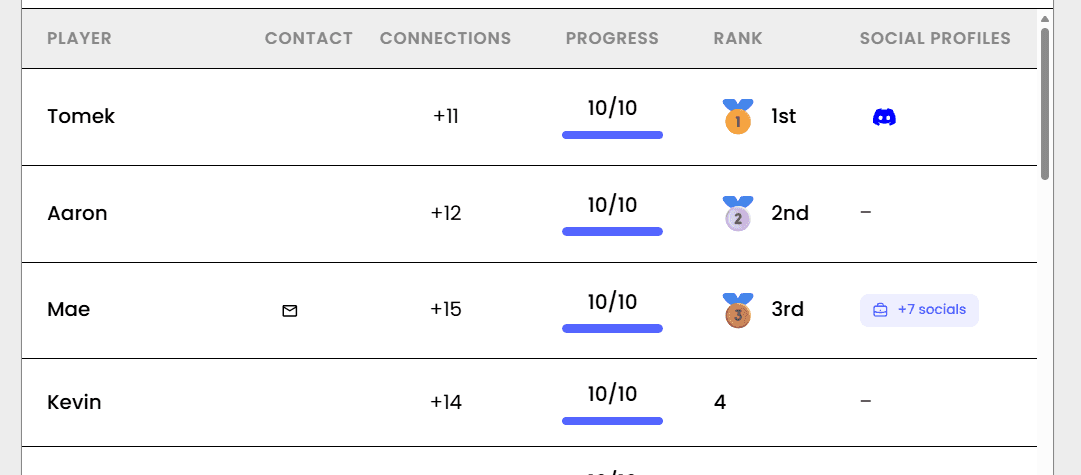
Every connection is saved, so each person gets a list of the people they met - with the contact info they shared and the conversations they had.
TipRecognize the people who met the most new people at the end - it's an easy way to wrap up.
Ready to Use the Virtual Speed Networking Bingo Icebreaker at Your Event?
Create a Jam Bingo, add your own prompts, and get a QR code for your event. You’ll be directed to the Create Account page first.
Have questions? Book a 15-minute demo.
Where to Use Virtual Speed Networking Bingo Icebreaker
Remote Team Offsites & Virtual Retreats
Your team is spread across the country. The CEO is trying to build culture on a screen. Everyone is tired of the same old virtual happy hours. The virtual speed networking bingo icebreaker saves the offsite by getting people talking about their hidden talents, favorite snacks, and childhood dreams instead of quarterly numbers.
- Break down silos between remote departments
- Make new hires feel like part of the team in 20 minutes
- Create inside jokes that actually stick
- Give quiet team members a comfortable way to contribute
Virtual Conferences & Webinar Mixers
Virtual conferences are notoriously lonely. Everyone joins, watches the screen, and leaves without talking to a soul. The virtual speed networking bingo icebreaker turns that isolated experience into a room full of strangers swapping stories and sharing contact info before the keynote even starts.
- Warm up the virtual room in minutes not hours
- Ensure people actually meet new contacts
- Create energy that carries into the main sessions
- Give introverts and extroverts an equal on ramp
Virtual Happy Hours & Social Events
Virtual happy hours are usually painful. Everyone stares at the screen, makes small talk for five minutes, and then mutes themselves. The virtual speed networking bingo icebreaker turns that into a lively game where people actually laugh and connect before the first virtual toast.
- Kill the awkward silence immediately
- Get people actually talking not just watching
- Make everyone feel included not invisible
- Create memories people actually talk about after
Virtual University & Alumni Networking
Virtual alumni events are famously stiff. The class of 1995 does not want to talk to the class of 2024. The virtual speed networking bingo icebreaker forces that cross generational chat in a way that feels fun not forced. The alum finds 'Uses TikTok' and the student finds 'Remembers dial up internet.' Connection made.
- Bridge the age gap instantly
- Make virtual networking feel like a game not a chore
- Increase donor engagement because people had fun
- Get students talking to alumni naturally
Virtual Volunteer Orientations
Volunteers are passionate but they are also strangers staring at a screen. The virtual speed networking bingo icebreaker warms up the room so when you start the serious presentation about the mission, people are actually listening because they just made 10 new friends.
- Increase volunteer retention through real connection
- Reduce the cliquey feeling of established groups
- Make virtual training sessions ten times more energetic
- Help new volunteers feel welcome from minute one
Distributed Company All Hands
You have 200 people on a video call. The CEO is presenting. No one is paying attention. Drop a virtual speed networking bingo icebreaker in the chat and suddenly everyone is energized. They meet new colleagues, share quick stories, and come back to the main session actually engaged.
- Build cross functional relationships at scale
- Make massive remote meetings feel small and personal
- Increase engagement in the main session
- Give people a reason to stay off mute
Virtual Speed Networking Bingo Icebreaker vs. Traditional Online Networking
| Feature | Traditional Virtual Networking | Virtual Speed Networking Bingo Icebreaker |
|---|---|---|
| Conversation Quality | So... what do you do? | Wait, you actually have a garden gnome collection? |
| Breakout Room Silence | Painfully common and awkward | Non existent. Everyone has a prompt to ask. |
| People Actually Remembered | 1 or 2 names if you are lucky | 8 to 12 people with actual shared stories |
| Introvert Experience | Horrifying. Please let me hide. | Comfortable. I know what to say every time. |
| Post Event Follow Up | Never happens. Nothing stood out. | High. You have real things to talk about. |
| Organizer Feedback | It was fine I guess. | Best virtual event we have ever had. |
Example Prompts for Virtual Speed Networking Bingo Icebreaker
Taken from the PropTech & Tools Showcase Social template. Use them as a starting point, then adapt them to your group.
Make people move
Start prompts with "Find someone who…" so each one sends players across the room to a new person, not back to their own table.
Mix easy and deeper prompts
Open with quick, observable prompts (something they're wearing, where they're from), then add a few that lead to a real story.
Keep them inclusive
Avoid prompts about money, looks, or anything someone could feel left out of. Everyone should be able to answer at least half of them.
Match the length of your event
Around 12–16 prompts fits a 30-minute game. More prompts than time just leaves people unfinished.
- 1
Find a vendor and ask for their 10-second pitch
- 2
Find a property manager who manages more than 1,000 units
- 3
Find someone who still runs part of their job on a spreadsheet
- 4
Find someone who tried a new tool this year
- 5
Find a broker and ask which app they open first every morning
- 6
Find someone from a startup with fewer than 20 people
- 7
Ask a property manager which tool saves them the most time each week
- 8
Ask a vendor what problem made them start their company
- 9
Ask an owner how they decide which new tool to try
- 10
Ask someone which tenant request they get most often
- 11
Ask someone which tech rollout went worst at their company
- 12
Ask a vendor which customer uses their tool in the most surprising way
See all 26 prompts in the PropTech & Tools Showcase Social template · Browse all templates
Other Platforms Like Jam Bingo
Jam Bingo is designed to help people actually get to know each other, not just exchange names. Unlike icebreaker games that focus on quick interactions or surface-level fun, Jam Bingo is built around meaningful conversations that make it easier for people to open up, find common ground, and build real relationships.
| Features | Jam Bingo | Hoogo | SocialPoint.io | Booth Bingo | Eventgamification.com |
|---|---|---|---|---|---|
| Paperless (QR Code Digital) | ✅ | ✅ | ✅ | ✅ | ✅ |
| Custom Branding | ✅ | ✅ | ✅ | ❌ | ❌ |
| Conversation Prompt | ✅ | ❌ | ❌ | ❌ | ❌ |
| Meaningful & Intentional Connections | ✅ | ❌ | ❌ | ❌ | ❌ |
| Contact Sharing (Email, Instagram, Linkedin, etc) | ✅ | ❌ | ❌ | ❌ | ❌ |
| Connect with people who aren't playing (scan their LinkedIn QR code, or enter their name + email or phone) | ✅ | ❌ | ❌ | ❌ | ❌ |
| Each person gets a list of everyone they connected with, including contact information and conversations they had. | ✅ | ❌ | ❌ | ❌ | ❌ |
| Introduction Forum | ✅ | ❌ | ❌ | ❌ | ❌ |
| Auto Introductions ("Introduce Me") | ✅ | ❌ | ❌ | ❌ | ❌ |
Frequently Asked Questions
Will people actually participate in a virtual speed networking bingo icebreaker?
Yes. Every single time. People are desperate to connect but they do not know how. The virtual speed networking bingo icebreaker gives them a perfect excuse to talk to strangers. Once the first person starts sharing stories, everyone else jumps in. The energy is infectious.
Do attendees need to download anything for this virtual bingo game?
Nope. That is the beautiful part. They just click a link and the game loads right in their browser. No app store. No password. No tech support calls. For a virtual event, that zero friction experience is everything.
How is this different from a spreadsheet or paper bingo?
Paper bingo does not work on Zoom. You cannot pass a sheet through the screen. The virtual speed networking bingo icebreaker lives on their phone or second screen. It tracks progress automatically, updates in real time, and keeps everyone engaged. No one loses their card under the keyboard.
How long should we run the virtual networking bingo game?
15 to 20 minutes is the sweet spot. Long enough for real conversations to happen. Short enough that people stay energized. You can also run it in multiple rounds throughout a longer virtual event. It works great as a warm up and as a closer.
What kind of virtual events work best for this bingo icebreaker?
Any virtual event where people need to connect. Remote team offsites, virtual conferences, online happy hours, digital alumni mixers, virtual volunteer orientations, even large company all hands meetings. If there is a video call involved, this game makes it better.
Can I customize the prompts for my specific virtual event?
Absolutely. You can add your own prompts in about two minutes. Tailor a few prompts to your company culture, your industry, or your event theme. The more personal the prompts feel, the more people engage. It takes the virtual speed networking bingo icebreaker from good to unforgettable.
The Simple Way to Get People Talking
Jam Bingo gets people having meaningful conversations and meeting as many new people as possible.
Networking Icebreaker Activities for SPARK Speed Networking Online
Jam Bingo is a networking icebreaker game that gives SPARK's online attendees a reason to connect beyond their breakout rooms.
GuideRemote Team Icebreakers for In-Person Offsites
JamBingo is an interactive icebreaker tool that helps remote teams meeting in-person build real relationships — turning unfamiliar coworkers into comfortable, connected teammates.
GuideDigital Networking Bingo for The Exchange Tower Annual Tenant Appreciation Night
Jam Bingo is a simple game that helps tenants from every floor and the building team mix and get to know each other at Tenant Appreciation Night.
Networking games15 Icebreaker Games for a Halloween Company Mixer
Spooky, work-friendly games that get coworkers talking across teams, costume or no costume.
Networking games12 Networking Games for a Corporate Holiday Mixer
Festive, inclusive games that get coworkers talking to people outside their own team before the year ends.
Networking games10 Unique Networking Games for New Student Engagement
You’ve got hundreds of nervous freshmen coming together at your upcoming event. Here’s how to get them talking and interacting with each other.