
Networking Bingo Generator
Create a custom icebreaker bingo game in 5 minutes. No design skills. No tech team. Just your event and your prompts.
Scan To Join
Game Code: QW40PM

What Is the Networking Bingo Generator?
The Networking Bingo Generator is a self-serve tool that lets anyone create a custom icebreaker bingo game in minutes. Share it with your attendees. That's it — just a game that gets people talking.
Event planners waste hours designing icebreakers that fall flat. The Networking Bingo Generator eliminates that waste. The result interactive networking, drives real connection — without any of the usual hassle or cost.
How Does Networking Bingo Generator Work?
Networking Bingo Generator runs on Jam Bingo—the simple, interactive networking activity. It is not a card, it has no squares, and attendees do not fill anything out. Here’s what each attendee does:
- 1
Scan to join
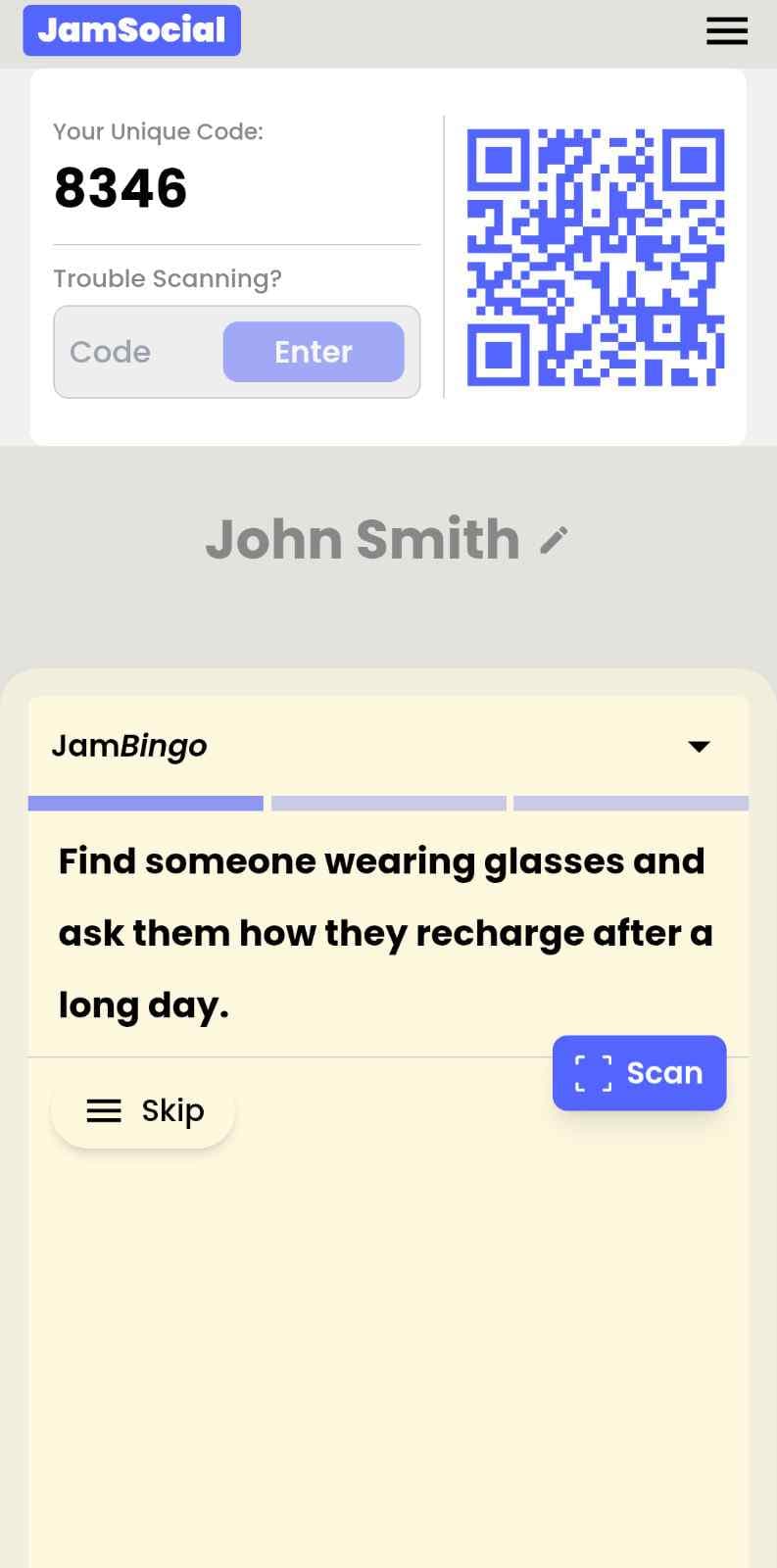
Attendees scan the event’s Jam Bingo QR code (or enter the game code). It runs in the phone’s browser—nothing to download.
- 2
Get a conversation prompt
Each person receives a conversation prompt on their phone, like a question to ask someone new.
- 3
Find someone and talk
They find someone who fits the prompt, have the conversation, then scan that person’s QR code (or enter their code) to unlock the next prompt.
- 4
Repeat and connect
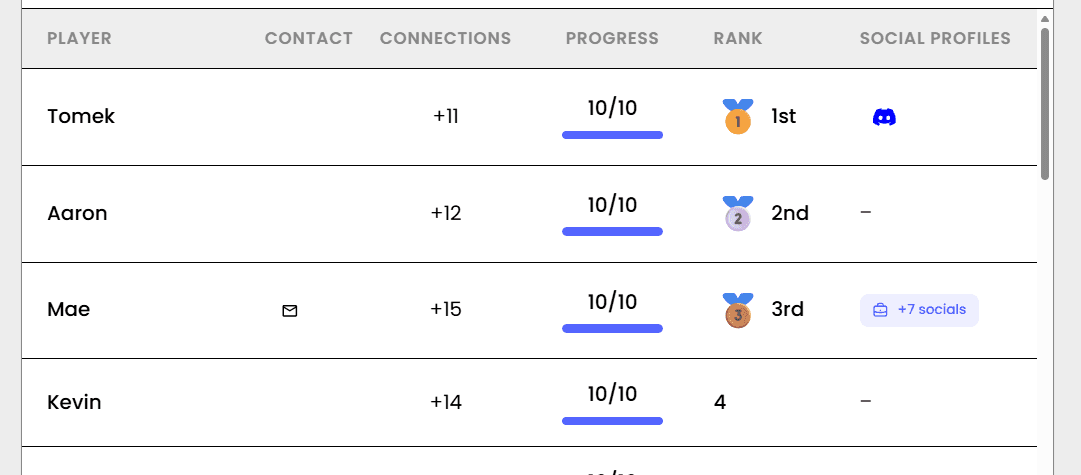
Every connection is saved, and the leaderboard shows who met the most new people—perfect for prizes.

How to Use the Networking Bingo Generator at Your Event
Follow these steps to set up and run the networking bingo generator for your own event.
- 01Step 1
Choose Your Prompts
Browse 500+ ready-made icebreakers or write your own custom prompts. Mix work and personal, easy and challenging. Save favorite prompts for future events.
TipUse 12-16 prompts for a 30-minute game. Too many prompts can overwhelm players and slow momentum. - 02Step 2
Customize Your Game
Add your logo, choose brand colors, and set your event name. The game automatically matches your brand — no design work required.
TipUpload a high-contrast logo for best results on both light and dark backgrounds. - 03Step 3
Generate & Share
Click generate. You'll get a unique QR code and game link. Print signs, share in email, or post on event apps. Your game is live instantly.
TipGenerate a test game first to preview exactly what attendees will see on their phones.
Ready to Use the Networking Bingo Generator at Your Event?
Create a Jam Bingo, add your own prompts, and get a QR code for your event. You’ll be directed to the Create Account page first.
Have questions? Book a 15-minute demo.
Where to Use Networking Bingo Generator
Event Planners & Organizers
Create custom icebreakers for every event in minutes — not hours. Save templates, duplicate for recurring events, and never start from scratch again.
- Reduce event prep time significantly
- Create consistent, branded experiences
- Save and reuse successful game templates
- Launch last-minute icebreakers instantly
HR & People Teams
Build a library of team-building games for different occasions — onboarding, all-hands, offsites, and weekly check-ins. Launch in minutes, not hours.
- Create consistent team connection experiences
- Save templates for different team sizes and goals
- Delegate game creation to any team member
- Track engagement across multiple games
Teachers & Educators
Create custom classroom icebreakers for the first day, after breaks, or whenever your class needs re-energizing. Save favorites for next semester.
- Build a library of grade-appropriate games
- Customize prompts for specific subjects or units
- Launch games in seconds, not prep periods
- Engage students without extra planning
Community Builders
Create custom icebreakers for meetups, mixers, and community events. Save templates for recurring events and adjust prompts for each gathering.
- Create professional games without design skills
- Save templates for weekly or monthly events
- Customize prompts for different community themes
- Launch games instantly at any gathering
Networking Bingo Generator vs. Manual Bingo Creation
| Feature | Manual Bingo Creation | Networking Bingo Generator |
|---|---|---|
| Time to Create | 2–4 hours (design, layout, print) | 5–10 minutes |
| Design Skills Needed | Yes (or hire someone) | None — automatic |
| Custom Branding | Additional cost & time | Included — 2 minutes |
| Reusable Templates | No — start over each time | Yes — save and duplicate |
| Mobile Experience | Paper only | Optimized for phones |
Example Prompts for Networking Bingo Generator
Taken from the Networking Event template. Use them as a starting point, then adapt them to your group.
Make people move
Start prompts with "Find someone who…" so each one sends players across the room to a new person, not back to their own table.
Mix easy and deeper prompts
Open with quick, observable prompts (something they're wearing, where they're from), then add a few that lead to a real story.
Keep them inclusive
Avoid prompts about money, looks, or anything someone could feel left out of. Everyone should be able to answer at least half of them.
Match the length of your event
Around 12–16 prompts fits a 30-minute game. More prompts than time just leaves people unfinished.
- 1
Ask someone what their favorite moment has been this year
- 2
Ask someone what accomplishment they are most proud of but rarely talk about
- 3
Ask someone what their most exciting personal or professional goal is right now
- 4
Ask someone how they recharge after a long day
- 5
Ask someone what they’re passionate about outside of work
- 6
Ask someone what advice they would give their younger self
- 7
Ask someone what hobby or interest they’d love to turn into a career
- 8
Ask someone what skill they’ve learned recently that has made the biggest impact in their life
- 9
Ask someone what project they are most excited about right now
- 10
Ask someone what motivates them to keep going on tough days
- 11
Ask someone what book or podcast has inspired them recently
- 12
Ask someone what has been their biggest learning experience this year
See all 60 prompts in the Networking Event template · Browse all templates
Other Platforms Like Jam Bingo
Jam Bingo is designed to help people actually get to know each other, not just exchange names. Unlike icebreaker games that focus on quick interactions or surface-level fun, Jam Bingo is built around meaningful conversations that make it easier for people to open up, find common ground, and build real relationships.
| Features | Jam Bingo | Hoogo | SocialPoint.io | Booth Bingo | Eventgamification.com |
|---|---|---|---|---|---|
| Paperless (QR Code Digital) | ✅ | ✅ | ✅ | ✅ | ✅ |
| Custom Branding | ✅ | ✅ | ✅ | ❌ | ❌ |
| Conversation Prompt | ✅ | ❌ | ❌ | ❌ | ❌ |
| Meaningful & Intentional Connections | ✅ | ❌ | ❌ | ❌ | ❌ |
| Contact Sharing (Email, Instagram, Linkedin, etc) | ✅ | ❌ | ❌ | ❌ | ❌ |
| Each person gets a list of everyone they connected with, including contact information and conversations they had. | ✅ | ❌ | ❌ | ❌ | ❌ |
| Introduction Forum | ✅ | ❌ | ❌ | ❌ | ❌ |
| Auto Introductions ("Introduce Me") | ✅ | ❌ | ❌ | ❌ | ❌ |
Frequently Asked Questions
How does the Networking Bingo Generator work?
You choose prompts from our library or write your own, customize colors and branding, then click generate. The tool creates a unique game link and QR code instantly. Share them with your attendees — they scan and play. No technical skills required.
Can I save and reuse games I've created?
Yes. Every game you create is saved to your account. You can duplicate, edit, or relaunch any previous game. Perfect for recurring events like weekly team meetings or monthly networking nights.
What customization options are available?
Add your logo, choose primary and secondary brand colors, set your event name, and customize any prompt. Enterprise plans include custom domains, advanced theming, and white-label options.
Do I need to know how to code or design?
No. The generator handles everything automatically. You just choose prompts and colors. The tool generates a professional, mobile-optimized game that looks great on any phone.
What types of events can I use this for?
Corporate events, conferences, weddings, classrooms, team building, networking mixers, student orientations, trade shows, and any gathering where you want people to actually meet each other.
Is there a limit to how many games I can create?
Free accounts can create and save up to 3 games. Pro accounts have unlimited game creation. Enterprise accounts include team collaboration and advanced features.
The Simple Way to Get People Talking
Jam Bingo gets people having meaningful conversations and meeting as many new people as possible.
Interactive Corporate Icebreaker Tools
The best interactive corporate icebreaker tools remove every barrier to joining, give each employee a clear reason to talk to someone new, and work the same for 20 people or 2,000 — so the tool fades into the background and the conversations take over.
GuideRun a Symposium Kickoff Networking Activity
JamBingo is a gamified networking kickoff designed for symposium environments — helping ~75 attendees in the wireless and telecom industry connect through structured personal, professional, and industry-specific prompts before keynote and panel sessions.
GuideWhat’s a Good Hackathon Icebreaker to Help Participants Interact?
Jam Bingo is an interactive networking tool designed to help developers, designers, and builders form teams and connect naturally before coding starts.
Icebreaker games10 Easy & No-Prep Interactive Networking Games for Professionals
No supplies, no setup, no awkward silence. Just games that get a room full of strangers actually talking.
Icebreaker games10 Unique Icebreaker Games for New Student Engagement
You’ve got hundreds of nervous freshmen coming together at your upcoming event. Here’s how to get them talking and interacting with each other.
Icebreaker games25 Icebreakers for an Association AGM & Tradeshow Mixer
These icebreakers turn a formal AGM and tradeshow into meaningful conversations.