
Interactive Discussion App
Turn a quiet room into dozens of real conversations, one discussion prompt at a time.

Why Use an Interactive Discussion App
Most group discussions end up the same way: the same three people talk while everyone else stays quiet. Polling and Q&A apps help people type answers, but they don't get people talking to each other. An interactive discussion app should get the whole room into real conversations.
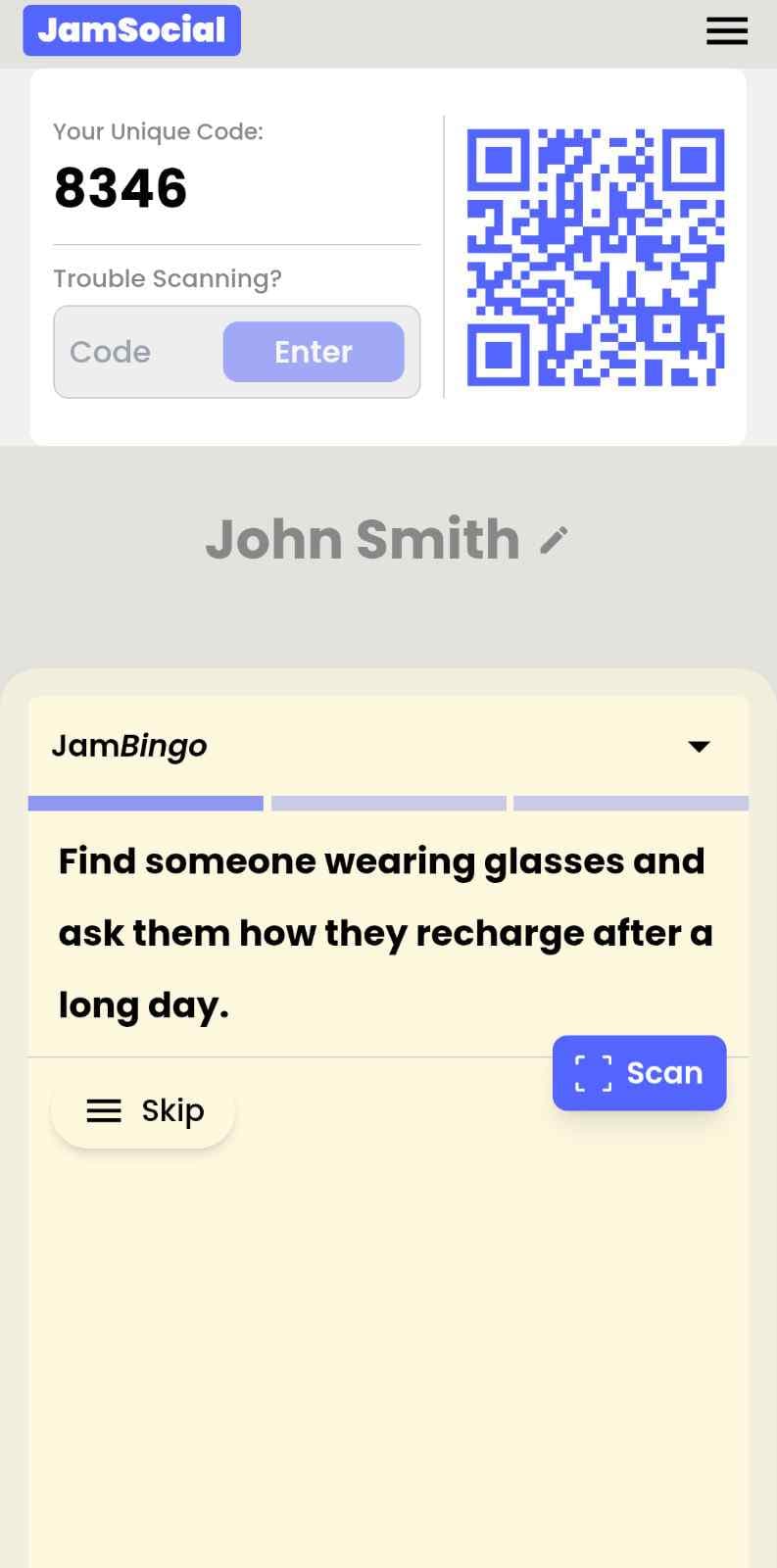
Jam Bingo gives each person one discussion prompt at a time on their phone, like 'Find someone who disagrees with you on today's topic and ask why.' They find a partner, talk it through, and scan that person's QR code to confirm it. That unlocks the next prompt. Everyone gets a different mix of prompts, so the room splits into many small discussions instead of one big quiet one, and every connection is saved for follow-up.
How?
Jam Bingo is the simplest networking game that gets everyone talking and learning more about each other.
1. during the networking session
Introduce Jam Bingo to get attendees started.
2. Attendees scan to participate
Guests open their phone camera and scan the QR Code.
3. A conversation starter To Connect
Each guest receives a tailored conversation starter.
4. The Exchange: Get People Talking
After chatting, scan the other person's QR Code to mark the connection and unlock your next prompt.
How to Use the Interactive Discussion App at Your Event
The interactive discussion app helps the people at your event meet new people, not just the people they came with. Here’s how to use it:
- 01Step 1
Decide How Many New People Each Person Meets
Create a Jam Bingo for your event and choose how many different people you'd like each person to talk with. That's the job of the Interactive Discussion App: getting people past the group they came with and into conversations with people they haven't met yet.
TipNot sure? Start with 5 people each - enough to get everyone past the group they came with. - 02Step 2
Add Conversation Prompts
Pick a ready-made template or write your own prompts. Each prompt gives people a reason to find someone new and a question to start the conversation.
TipKeep prompts about people, not trivia - "Find someone who…" sends people across the room to someone new. - 03Step 3
Display Your Jam Bingo QR Code
Put your Jam Bingo QR code on the big screen, at check-in, or on table cards. People scan it with their phone camera to join - no app to download.
TipExplain it once, in one line: scan, find someone who fits your prompt, talk, then scan each other's QR code. - 04Step 4
Let People Meet New People
Each person gets a conversation prompt, finds someone who fits it, and talks with them. Then they scan that person's QR code to get their next prompt and meet someone else.
TipGive it 20 to 45 minutes during a reception, break, or networking session. - 05Step 5
Everyone Leaves With Their Connections
Every connection is saved, so each person gets a list of the people they met - with the contact info they shared and the conversations they had.
TipRecognize the people who met the most new people at the end - it's an easy way to wrap up.
Ready to Use the Interactive Discussion App at Your Event?
Create a Jam Bingo, add your own prompts, and get a QR code for your event. You’ll be directed to the Create Account page first.
Have questions? Book a 15-minute demo.
Where to Use Interactive Discussion App
Classrooms and Lectures
Get every student discussing the material, not just the ones in the front row.
- Quiet students join in
- Students meet new classmates
- No printing
Workshops and Trainings
Help attendees share ideas and learn from each other between sessions.
- Ideas spread across the room
- Attendees meet new people
- Easy to run between talks
Team Meetings and Offsites
Turn a one-way meeting into conversations between teammates who rarely talk.
- Crosses team lines
- Everyone gets heard
- Connections saved
Interactive Discussion App vs. Traditional Group Discussion
| Feature | Traditional Group Discussion | Jam Bingo Discussion App |
|---|---|---|
| Who talks | The same few voices | Everyone, in pairs and small groups |
| Getting started | Awkward silence after the question | A prompt tells each person who to find |
| Topics | One question for the whole room | Different prompts for each person |
| Who people talk to | Whoever they sat next to | New partners for every prompt |
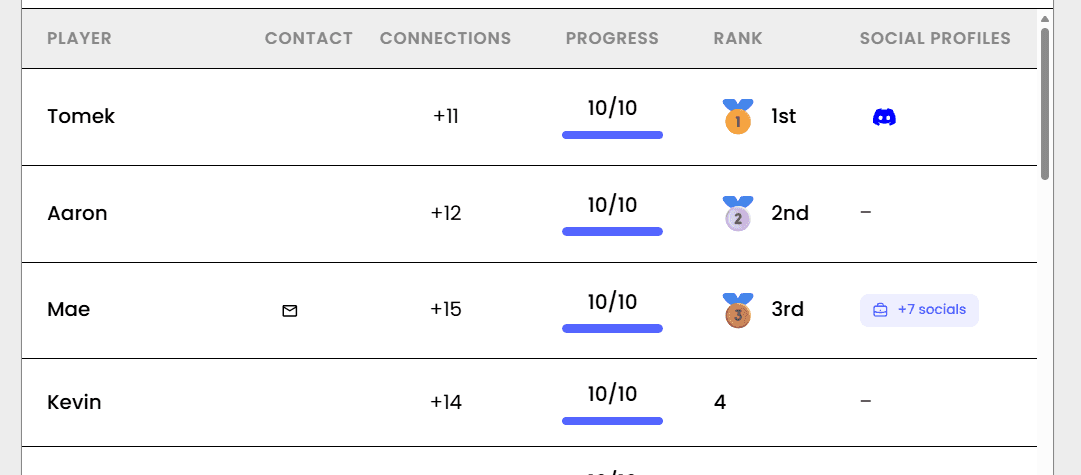
| Tracking participation | Hard to see who joined in | Live leaderboard of conversations |
| After the session | Ideas and contacts are lost | Connections saved to follow up |
Example Prompts for Interactive Discussion App
Taken from the University Classroom template. Use them as a starting point, then adapt them to your group.
Make people move
Start prompts with "Find someone who…" so each one sends players across the room to a new person, not back to their own table.
Mix easy and deeper prompts
Open with quick, observable prompts (something they're wearing, where they're from), then add a few that lead to a real story.
Keep them inclusive
Avoid prompts about money, looks, or anything someone could feel left out of. Everyone should be able to answer at least half of them.
Match the length of your event
Around 12–16 prompts fits a 30-minute game. More prompts than time just leaves people unfinished.
- 1
Find someone in your major taking this as an elective, and ask them how they'd spend a completely free day
- 2
Find a classmate who's read the professor's published work, and ask them what's the best advice they've ever gotten
- 3
Find someone who can summarize last lecture's key points, and ask them what they're most excited about right now
- 4
Find a person who's taken a prerequisite at another school, and ask them what they're looking forward to this week
- 5
Find someone who shares your career aspirations, and ask them what their favorite way to spend a Friday night is
- 6
Find someone who has traveled to another country, and ask them what they'd want to learn if they had unlimited time
- 7
Find someone who plays a musical instrument, and ask them what's one thing on their bucket list
- 8
Find someone who is in a campus club or organization, and ask them what their favorite way to relax is
- 9
Find someone who has a favorite study spot on campus, and ask them what they'd do with an extra hour every day
- 10
Ask someone who can recommend a professor or course
- 11
Ask someone who has a fun or unusual hobby
- 12
Ask someone who listens to music while studying and ask what song
See all 25 prompts in the University Classroom template · Browse all templates
Other Platforms Like Jam Bingo
Jam Bingo is designed to help people actually get to know each other, not just exchange names. Unlike icebreaker games that focus on quick interactions or surface-level fun, Jam Bingo is built around meaningful conversations that make it easier for people to open up, find common ground, and build real relationships.
| Features | Jam Bingo | Hoogo | SocialPoint.io | Booth Bingo | Eventgamification.com |
|---|---|---|---|---|---|
| Paperless (QR Code Digital) | ✅ | ✅ | ✅ | ✅ | ✅ |
| Custom Branding | ✅ | ✅ | ✅ | ❌ | ❌ |
| Conversation Prompt | ✅ | ❌ | ❌ | ❌ | ❌ |
| Meaningful & Intentional Connections | ✅ | ❌ | ❌ | ❌ | ❌ |
| Contact Sharing (Email, Instagram, Linkedin, etc) | ✅ | ❌ | ❌ | ❌ | ❌ |
| Connect with people who aren't playing (scan their LinkedIn QR code, or enter their name + email or phone) | ✅ | ❌ | ❌ | ❌ | ❌ |
| Each person gets a list of everyone they connected with, including contact information and conversations they had. | ✅ | ❌ | ❌ | ❌ | ❌ |
| Introduction Forum | ✅ | ❌ | ❌ | ❌ | ❌ |
| Auto Introductions ("Introduce Me") | ✅ | ❌ | ❌ | ❌ | ❌ |
Frequently Asked Questions
What is an interactive discussion app?
A tool that gets people discussing a topic with each other. With Jam Bingo, each person gets discussion prompts on their phone, finds a partner who fits the prompt, talks it through and scans their QR code to connect.
How is this different from a polling or Q&A app?
Polling and Q&A apps collect typed answers on a screen. Jam Bingo gets people out of their seats and talking face to face, so more voices are heard and people actually connect.
Do participants need to download an app?
No. Participants scan one QR code with their phone camera and play in the browser.
Can I write discussion prompts for my topic?
Yes. Write prompts that match your lesson, workshop or meeting, or start from a ready-made template and edit it.
How many people can join?
From small groups of 10 to events with 1,000+ people. Everyone plays at the same time.
Does it work for online discussions?
It's built for in-person sessions, since people scan each other's QR codes. It works best for classrooms, workshops, trainings and in-person meetings.
The Simple Way to Get People Talking
Jam Bingo gets people having meaningful conversations and meeting as many new people as possible.
Get to Know You Scavenger Hunt for PropTech & Tools Showcase Social
Jam Bingo is a simple game that helps property managers, owners, brokers, and PropTech vendors mix and get to know each other at PropTech Showcase Social.
GuideClassroom Icebreakers for the First Day of Class
JamBingo is a simple, engaging classroom icebreaker that helps students discover shared interests, break down social barriers, and build classroom community — all while having fun.
GuideInteractive Icebreaker Games for Large Groups
Jam Bingo is an interactive networking tool that helps people in large groups get to know one another through meaningful conversations, instead of staying stuck in surface-level conversations with the people they already know.
Networking games11 Networking Games for Large Groups
Games the whole room plays at once, so 300 strangers become 300 conversations.
Networking games10 Company Annual Gathering Interactive Ice breaker Activities
Your annual gathering should feel like a celebration, not a compliance event. These icebreakers help people actually connect around the year that was — and get excited for what's next.
Networking games10 Easy & No-Prep Interactive Networking Games for Professionals
No supplies, no setup, no awkward silence. Just games that get a room full of strangers actually talking.