
Bingo Card with QR Code? Skip the Card
Stop printing paper copies. With one QR code, anyone with a phone can join and play — no setup hassle, and no card at all.
Scan To Join
Game Code: QW40PM

Is There a Bingo Card with a QR Code?
People searching for a bingo card with a QR code usually want to stop printing paper cards. Jam Bingo goes one step further: there is no card at all. You display or print a single QR code. Players scan it with their phone camera and get a conversation prompt on their screen. They find someone who fits the prompt, have the conversation, and scan that person's QR code to unlock the next prompt. The result? Zero printing, zero lost cards, zero setup time, and higher participation because joining takes two seconds.
Traditional bingo is a logistical pain. You need to print hundreds of cards, distribute them, collect them, manage daubers or markers, and deal with lost or damaged cards. A QR code eliminates all of that. Players bring their own devices (which they already have). The game tracks every connection automatically, and the leaderboard shows who's met the most people. And when the game ends? No cleanup. No recycling. Whether you're running a classroom icebreaker, a corporate networking session, or a wedding reception activity, a QR code game is faster and more engaging than paper.
How Does Bingo Card with QR Code? Skip the Card Work?
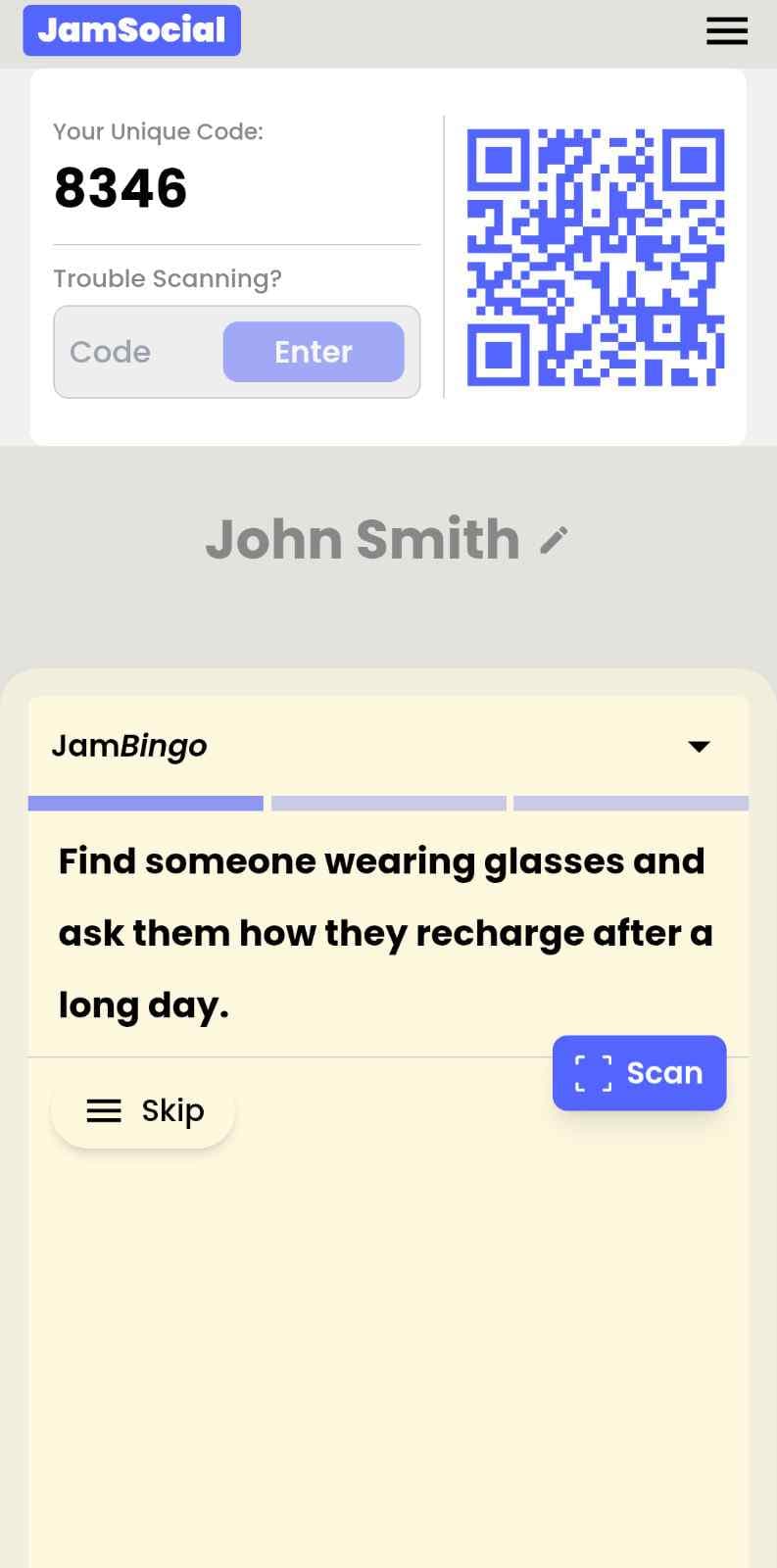
Bingo Card with QR Code? Skip the Card runs on Jam Bingo—the simple, interactive networking activity. It is not a card, it has no squares, and attendees do not fill anything out. Here’s what each attendee does:
- 1
Scan to join
Attendees scan the event’s Jam Bingo QR code (or enter the game code). It runs in the phone’s browser—nothing to download.
- 2
Get a conversation prompt
Each person receives a conversation prompt on their phone, like a question to ask someone new.
- 3
Find someone and talk
They find someone who fits the prompt, have the conversation, then scan that person’s QR code (or enter their code) to unlock the next prompt.
- 4
Repeat and connect
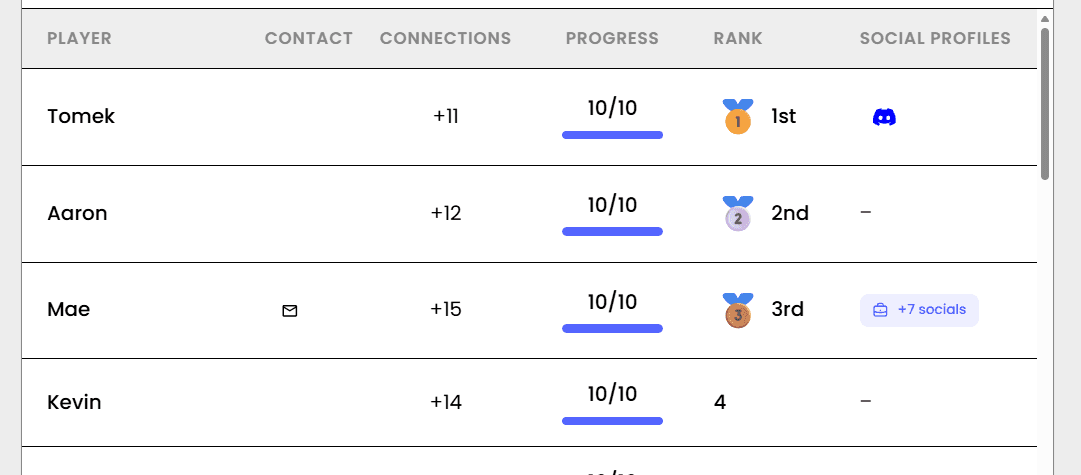
Every connection is saved, and the leaderboard shows who met the most new people—perfect for prizes.

How to Use the Bingo Card with QR Code? Skip the Card at Your Event
Follow these steps to set up and run the bingo card with qr code? skip the card for your own event.
- 01Step 1
Create Your Jam Bingo Prompts
Write your own conversation prompts, questions, or challenges — or borrow from ready-made templates. Each player gets one prompt at a time on their phone.
TipStart with fewer prompts for shorter games or nervous groups. Quick wins build momentum. - 02Step 2
Generate Your QR Code
Create your Jam Bingo to get a unique QR code for your game. Download the QR code as an image file — ready to print, share, or display on any screen.
TipSave the QR code image to your desktop. You'll use it again and again for future games. - 03Step 3
Share & Watch Players Join Instantly
Display the QR code on a screen, print it on flyers, or share the link in a chat. Players scan with their phone camera and start playing immediately — no typing URLs, no app downloads, no accounts.
TipPrint the QR code at 2-3 inches minimum. Big enough to scan from a few feet away.
Ready to Use the Bingo Card with QR Code? Skip the Card at Your Event?
Create a Jam Bingo, add your own prompts, and get a QR code for your event. You’ll be directed to the Create Account page first.
Have questions? Book a 15-minute demo.
Where to Use Bingo Card with QR Code? Skip the Card
Classroom Review Games & Vocabulary Bingo
Replace paper bingo cards with a single QR code. Students scan, play, and learn — no more cutting, laminating, or collecting cards. Teachers love the time savings.
- Eliminate 30+ minutes of prep work per game
- Never lose or damage another bingo card
- Track which students are mastering the material
- Play again instantly with new content — same QR code
Corporate Icebreakers & Team Building
Get colleagues talking without the awkwardness. With one QR code, employees scan, get conversation prompts, and start mingling — no printed sheets, no forced circles, just natural connection.
- Zero printing costs for team events
- Employees use their own phones (no supplies needed)
- See participation data in real time
- Reuse the same QR code for weekly team building
Wedding Receptions & Guest Activities
Keep guests entertained between courses. With a QR code on each table, guests scan, play, and mingle — no paper cards to collect, no markers to lose, just fun.
- No printing hundreds of bingo cards for each table
- Guests play on their own phones (everyone has one)
- Track who wins without shouting across the room
- Eco-friendly — no paper waste after your wedding
Conference Networking & Attendee Engagement
Get attendees talking, visiting sponsors, and staying engaged. A QR code on badges means every attendee has instant access to your networking game — no app downloads required.
- 80-95% participation rates (vs 20-40% for event apps)
- No app store friction — scan and play
- Track sponsor visits and session attendance
- Provide measurable ROI to sponsors
Summer Camps & Youth Groups
Get campers mixing and making friends on day one. With one QR code there are no lost paper cards, no markers to track, and counselors can see who's participating on the leaderboard.
- Campers use phones they already have
- No paper cards blowing away in the wind
- Counselors can monitor participation remotely
- Play multiple games with the same QR code
Senior Centers & Community Events
Accessible, simple, and frustration-free. With one QR code, seniors don't need to manage paper cards or daubers — just scan and play. Staff love the reduced cleanup and supplies.
- No small pieces to lose or drop
- Larger text options for visibility
- Staff can monitor multiple games at once
- Zero paper waste and no supply costs
Jam Bingo (QR Code) vs. Traditional Paper Bingo
| Feature | Traditional Paper Bingo | Bingo Card with QR Code? Skip the Card |
|---|---|---|
| Setup Time | 30–60 min (print, cut, distribute) | 5–10 min (digital creation) |
| Lost Cards | Common — game interrupted | Impossible — it lives on their phone |
| Player Tracking | Manual — winner calls out | Automatic — live leaderboard |
| Reusability | One-time use only | Use same QR code forever |
| Environmental Impact | High — paper waste | Zero — paperless |
Example Prompts for Bingo Card with QR Code? Skip the Card
Taken from the Large Corporate Event Icebreaker template. Use them as a starting point, then adapt them to your group.
Make people move
Start prompts with "Find someone who…" so each one sends players across the room to a new person, not back to their own table.
Mix easy and deeper prompts
Open with quick, observable prompts (something they're wearing, where they're from), then add a few that lead to a real story.
Keep them inclusive
Avoid prompts about money, looks, or anything someone could feel left out of. Everyone should be able to answer at least half of them.
Match the length of your event
Around 12–16 prompts fits a 30-minute game. More prompts than time just leaves people unfinished.
- 1
Find someone from a department you've never worked with and ask what a normal day looks like for them
- 2
Find someone who works in a different office or city and ask what their favorite lunch spot near work is
- 3
Find someone who started this year and ask what surprised them most about the company
- 4
Find someone who has been here longer than you and ask what's changed the most since they joined
- 5
Find someone whose job you couldn't explain in one sentence, and ask them to explain it in one sentence
- 6
Find someone you've emailed but never met in person
- 7
Ask someone what project they're most proud of this year
- 8
Ask someone what their first job ever was
- 9
Find someone who has worked in more than one department here
- 10
Ask someone what's one tool or app that saves them hours every week
- 11
Challenge someone to name three things your two teams have in common
- 12
Find someone who has a hidden talent their coworkers don't know about
See all 15 prompts in the Large Corporate Event Icebreaker template · Browse all templates
Other Platforms Like Jam Bingo
Jam Bingo is designed to help people actually get to know each other, not just exchange names. Unlike icebreaker games that focus on quick interactions or surface-level fun, Jam Bingo is built around meaningful conversations that make it easier for people to open up, find common ground, and build real relationships.
| Features | Jam Bingo | Hoogo | SocialPoint.io | Booth Bingo | Eventgamification.com |
|---|---|---|---|---|---|
| Paperless (QR Code Digital) | ✅ | ✅ | ✅ | ✅ | ✅ |
| Custom Branding | ✅ | ✅ | ✅ | ❌ | ❌ |
| Conversation Prompt | ✅ | ❌ | ❌ | ❌ | ❌ |
| Meaningful & Intentional Connections | ✅ | ❌ | ❌ | ❌ | ❌ |
| Contact Sharing (Email, Instagram, Linkedin, etc) | ✅ | ❌ | ❌ | ❌ | ❌ |
| Each person gets a list of everyone they connected with, including contact information and conversations they had. | ✅ | ❌ | ❌ | ❌ | ❌ |
| Introduction Forum | ✅ | ❌ | ❌ | ❌ | ❌ |
| Auto Introductions ("Introduce Me") | ✅ | ❌ | ❌ | ❌ | ❌ |
Frequently Asked Questions
Is there a bingo card with a QR code?
Jam Bingo replaces the bingo card entirely. Players scan a QR code with their phone camera and get conversation prompts on their phone — no paper cards, no daubers, no setup. They find someone who fits each prompt and scan that person's QR code to unlock the next one, and the game tracks every connection automatically. Perfect for events, classrooms, and any group activity.
Do players need to download an app?
No. Every smartphone can scan QR codes directly from the camera app. No app store, no account creation, no login. Players tap the link that appears and the game loads instantly in their browser. This is why participation rates are so high — there's literally zero friction.
Can I customize the prompts?
Absolutely. You choose every prompt. Add questions, challenges, or even emojis. Create icebreaker prompts ('Find someone who...'), educational prompts (vocabulary words), corporate prompts (workplace inside jokes), or party prompts (fun dares). The game is fully yours.
Do I need Wi-Fi or internet?
Players need an internet connection to join the game in their browser. For venues without reliable Wi-Fi, check that attendees have mobile data or a guest network before you start. We recommend having a basic connection for the best experience.
How many people can play at once?
Unlimited. The same QR code works for 5 people or 5,000. Players get prompts in a random order, so people spread out and meet different people. Perfect for large conferences, school assemblies, or community events.
Can I see who's winning in real time?
Yes. The organizer dashboard shows a live leaderboard of who met the most new people, so you can announce winners without interrupting the game.
The Simple Way to Get People Talking
Jam Bingo gets people having meaningful conversations and meeting as many new people as possible.
Interactive Platform to Play Get to Know You Bingo for 300 People
Jam Bingo is an interactive networking tool that helps attendees mingle naturally and skip awkward small talk at large events.
GuideHelp Seniors Practice Learning QR Codes
JamBingo is a gentle, gamified tool that helps seniors build digital literacy skills — turning QR code anxiety into confident, everyday independence.
GuideQR Code Activity to Help with Digital Literacy
JamBingo is a gamified QR code activity to help with digital literacy — for all ages.
Icebreaker games10 Company Annual Gathering Interactive Ice breaker Activities
Your annual gathering should feel like a celebration, not a compliance event. These icebreakers help people actually connect around the year that was — and get excited for what's next.
Icebreaker games10 Easy & No-Prep Interactive Networking Games for Professionals
No supplies, no setup, no awkward silence. Just games that get a room full of strangers actually talking.
Icebreaker games10 Unique Icebreaker Games for New Student Engagement
You’ve got hundreds of nervous freshmen coming together at your upcoming event. Here’s how to get them talking and interacting with each other.