
Virtual Bingo
Everything you love about bingo — minus the paper, the printing, and the person who always loses their card.
What Is Virtual Bingo?
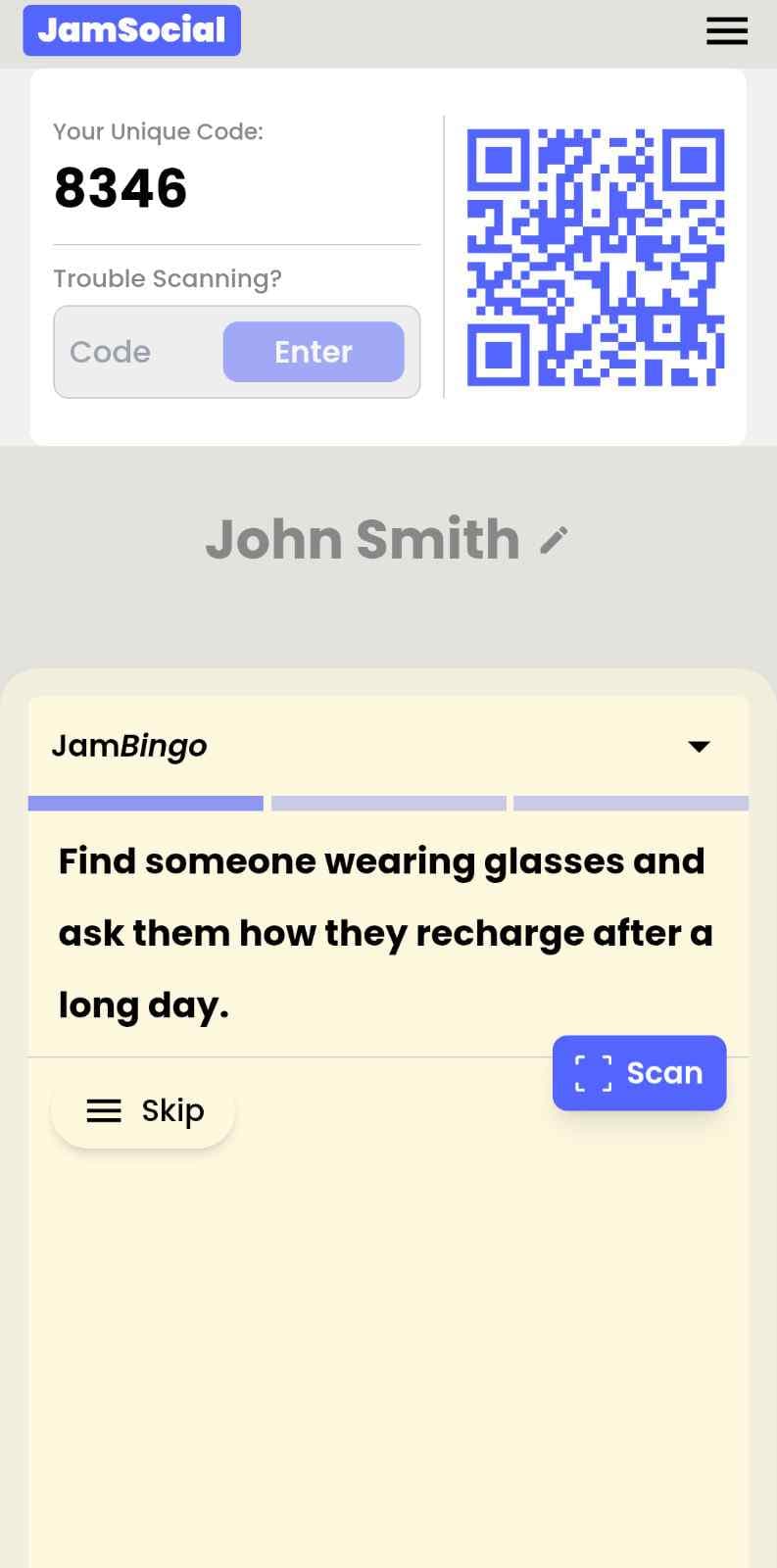
Virtual Bingo is bingo that runs entirely on people's phones — no paper cards, no printed sheets, no prep work beyond picking your prompts. Everyone in the room scans a QR code or taps a link, gets their first conversation prompt, and plays. Instead of a card with squares, each player gets one prompt at a time and unlocks the next one after each conversation — and nobody loses their sheet under a coat. Teachers use it to make vocabulary practice actually engaging. Event organizers use it to get rooms full of strangers talking to each other. HR teams use it to make icebreakers feel less like icebreakers. Whatever the room, whatever the goal — virtual bingo gets people participating.
The thing about paper bingo is that it works — people genuinely enjoy it. The problem is everything around it: the printing, the distributing, the collecting, the person who spills a drink on theirs, the fact that it completely falls apart the second anyone is joining remotely. Virtual Bingo keeps everything that makes bingo great and removes every bit of friction that makes it a pain to run. Same energy, zero hassle. And because it runs on the phone everyone already has in their pocket, participation is higher, engagement lasts longer, and you actually get data on how it went.
How Does Virtual Bingo Work?
Virtual Bingo runs on Jam Bingo—the simple, interactive networking activity. It is not a card, it has no squares, and attendees do not fill anything out. Here’s what each attendee does:
How is Jam Bingo Played?
Attendees scan the event’s Jam Bingo QR code (or enter the game code). It runs in the phone’s browser—there is no app to download.


How to Use the Virtual Bingo at Your Event
The virtual bingo helps the people at your event meet new people, not just the people they came with. Here’s how to use it:
- 01Step 1
Decide How Many New People Each Person Meets
Create a Jam Bingo for your event and choose how many different people you'd like each person to talk with. That's the job of the Virtual Bingo: getting people past the group they came with and into conversations with people they haven't met yet.
TipNot sure? Start with 5 people each - enough to get everyone past the group they came with. - 02Step 2
Add Conversation Prompts
Pick a ready-made template or write your own prompts. Each prompt gives people a reason to find someone new and a question to start the conversation.
TipKeep prompts about people, not trivia - "Find someone who…" sends people across the room to someone new. - 03Step 3
Display Your Jam Bingo QR Code
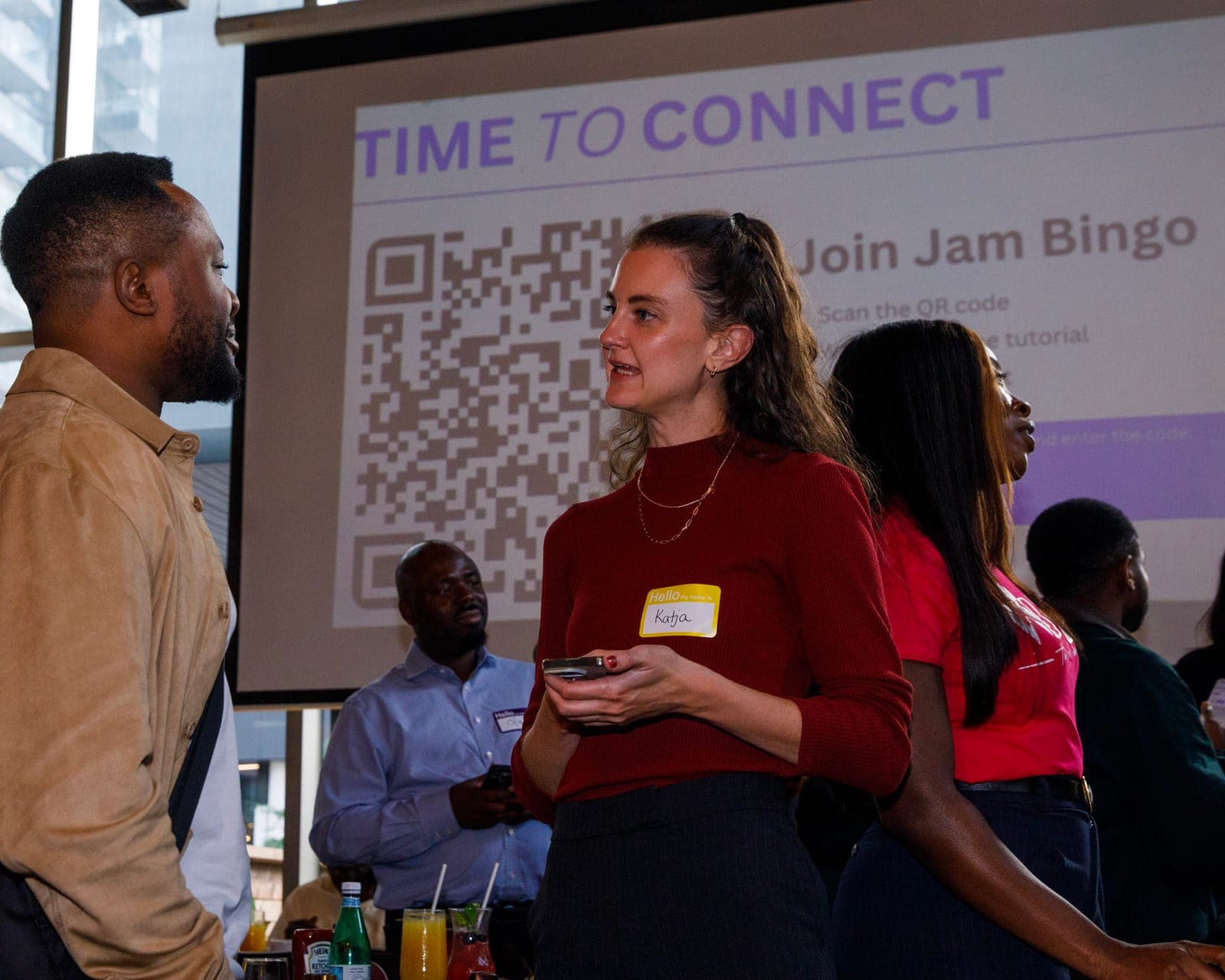
Put your Jam Bingo QR code on the big screen, at check-in, or on table cards. People scan it with their phone camera to join - no app to download.
TipExplain it once, in one line: scan, find someone who fits your prompt, talk, then scan each other's QR code. - 04Step 4
Let People Meet New People
Each person gets a conversation prompt, finds someone who fits it, and talks with them. Then they scan that person's QR code to get their next prompt and meet someone else.
TipGive it 20 to 45 minutes during a reception, break, or networking session. - 05Step 5
Everyone Leaves With Their Connections
Every connection is saved, so each person gets a list of the people they met - with the contact info they shared and the conversations they had.
TipRecognize the people who met the most new people at the end - it's an easy way to wrap up.
Ready to Use the Virtual Bingo at Your Event?
Create a Jam Bingo, add your own prompts, and get a QR code for your event. You’ll be directed to the Create Account page first.
Have questions? Book a 15-minute demo.
Where to Use Virtual Bingo
Classroom Vocabulary & Speaking Practice
Virtual bingo turns the vocabulary review your students dread into the activity they actually ask for. Instead of printing a new set of cards every lesson, you build the game once, share a QR code, and watch students scan in and start competing. Use it for 'find someone who' speaking practice, vocabulary matching, grammar challenges — whatever fits what you're covering that day.
- Never print bingo cards again — build once, reuse and edit anytime
- Get students up, moving, and speaking instead of sitting passively
- Works for any subject, any level, any classroom size
- Identify which students are engaging and which need more support in real time
School & University Orientation
Orientation is the perfect moment for virtual bingo — everyone is equally new, equally nervous, and equally looking for a reason to talk to someone. Share the QR code at the start of the session and let the game do the introductions. Students scan in, find people who match their prompts, and walk away knowing at least a handful of names before the day is over.
- Get students talking to each other before formal programming starts
- Works for cohorts of 30 or auditoriums of 3,000
- Give international or shy students a low-pressure way to make first contact
- Create a shared memory from day one that people actually talk about
Corporate Events & Team Socials
Virtual bingo is the corporate icebreaker that doesn't feel like one. Employees scan in as they arrive, get prompts about their colleagues, and start moving around the room with an actual reason to talk to people they've emailed for months but never met. No facilitation required — the game runs itself while connections form around you.
- Break employees out of their department clusters naturally
- Works as a standalone activity or a warm-up running alongside your main agenda
- Give introverts a structured, low-pressure way to participate
- Walk away with participation data instead of just hoping it went well
Networking Events & Conferences
Most conference networking sessions are just people standing around not knowing what to say. Virtual bingo fixes that immediately. One QR code at the entrance and every attendee has conversation prompts in their pocket — a built-in reason to approach anyone in the room and an actual script for what to say when they do.
- Give every attendee a reason to approach strangers — not just the extroverts
- Drive significantly more conversations per person than unstructured networking
- Keep the game running across the whole event day, not just one session
- Show sponsors measurable engagement data from the networking component
Workshop & Training Openers
Whether it's a leadership workshop, a DEI training, a wellness session, or a skills course — virtual bingo is the opener that actually warms the room up. Match the prompts to what you're about to cover and participants arrive at your first slide already thinking about the topic, already having had a small version of the conversation you're about to facilitate.
- Prime participants for the content before you've said a word
- Create psychological safety in the room through low-stakes gameplay
- Replace 'let's go around and introduce ourselves' with something people enjoy
- Transition naturally from the game into your session using what came up
Weddings, Parties & Social Events
Virtual bingo is the party icebreaker that guests actually talk about afterward. Put a QR code on the tables, mention it during the welcome remarks, and watch people from completely different corners of someone's life find their way into conversations they never would have started on their own. No paper, no coordination — just a phone and a reason to mingle.
- Blend friend groups, families, and colleagues who don't know each other
- Fill cocktail hour or downtime with genuine interaction
- Works for 20 people at a dinner party or 300 at a wedding reception
- Give guests something memorable to associate with the event
Virtual Bingo vs. Paper Bingo
| Feature | Paper Bingo | Virtual Bingo |
|---|---|---|
| Setup Time | 30–60 min printing, cutting, distributing | 5 min — QR code on a slide, done |
| Lost or Damaged Cards | Happens every single time | Lives on their phone — can't lose it |
| Works for Hybrid Groups | Remote participants are completely left out | Everyone plays the same game from their device |
| Participation Rate | 50–65% — sheets get ignored or misplaced | 85–95% — game is already in their hand |
| After the Activity | Cards in the bin, no record it happened | Participation data, completion rates, engagement stats |
| Customization | Reprint everything if you want to change a prompt | Edit prompts in seconds, reshare the same link |
Example Prompts for Virtual Bingo
Taken from the Networking Event template. Use them as a starting point, then adapt them to your group.
Make people move
Start prompts with "Find someone who…" so each one sends players across the room to a new person, not back to their own table.
Mix easy and deeper prompts
Open with quick, observable prompts (something they're wearing, where they're from), then add a few that lead to a real story.
Keep them inclusive
Avoid prompts about money, looks, or anything someone could feel left out of. Everyone should be able to answer at least half of them.
Match the length of your event
Around 12–16 prompts fits a 30-minute game. More prompts than time just leaves people unfinished.
- 1
Ask someone what their favorite moment has been this year
- 2
Ask someone what accomplishment they are most proud of but rarely talk about
- 3
Ask someone what their most exciting personal or professional goal is right now
- 4
Ask someone how they recharge after a long day
- 5
Ask someone what they’re passionate about outside of work
- 6
Ask someone what advice they would give their younger self
- 7
Ask someone what hobby or interest they’d love to turn into a career
- 8
Ask someone what skill they’ve learned recently that has made the biggest impact in their life
- 9
Ask someone what project they are most excited about right now
- 10
Ask someone what motivates them to keep going on tough days
- 11
Ask someone what book or podcast has inspired them recently
- 12
Ask someone what has been their biggest learning experience this year
See all 60 prompts in the Networking Event template · Browse all templates
Other Platforms Like Jam Bingo
Jam Bingo is designed to help people actually get to know each other, not just exchange names. Unlike icebreaker games that focus on quick interactions or surface-level fun, Jam Bingo is built around meaningful conversations that make it easier for people to open up, find common ground, and build real relationships.
| Features | Jam Bingo | Hoogo | SocialPoint.io | Booth Bingo | Eventgamification.com |
|---|---|---|---|---|---|
| Paperless (QR Code Digital) | ✅ | ✅ | ✅ | ✅ | ✅ |
| Custom Branding | ✅ | ✅ | ✅ | ❌ | ❌ |
| Conversation Prompt | ✅ | ❌ | ❌ | ❌ | ❌ |
| Meaningful & Intentional Connections | ✅ | ❌ | ❌ | ❌ | ❌ |
| Contact Sharing (Email, Instagram, Linkedin, etc) | ✅ | ❌ | ❌ | ❌ | ❌ |
| Each person gets a list of everyone they connected with, including contact information and conversations they had. | ✅ | ❌ | ❌ | ❌ | ❌ |
| Introduction Forum | ✅ | ❌ | ❌ | ❌ | ❌ |
| Auto Introductions ("Introduce Me") | ✅ | ❌ | ❌ | ❌ | ❌ |
Frequently Asked Questions
What is virtual bingo?
Virtual bingo is a fully digital version of the classic bingo game that runs on participants' phones instead of paper cards. Everyone joins by scanning a QR code or tapping a link — no printing, no app download, no setup beyond choosing your prompts. It works in classrooms, at events, during team gatherings, or anywhere you'd normally use paper bingo but want something easier and more engaging.
How is virtual bingo different from regular bingo?
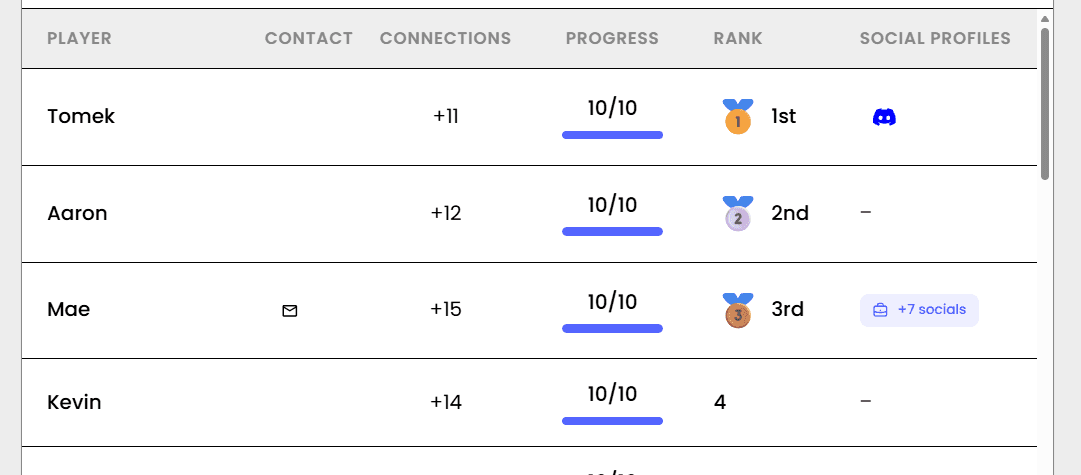
The idea is the same — find people who match a prompt. The difference is everything around it. No printing, no paper, no losing cards, no running out of copies. Instead of a card, each player gets one prompt at a time and unlocks the next after each conversation. You can update prompts instantly without reprinting anything. And the leaderboard shows who met the most people instead of you guessing whether it went well.
Do participants need to download an app?
Nothing to download at all. They point their phone camera at a QR code — or tap a link you share — and the game opens immediately in their browser. That's it. No app store, no account creation, no tech support moment while the room waits. It just works on every phone.
Can I use virtual bingo in a classroom?
Yes — and teachers are some of the biggest fans of it for exactly this reason. Instead of printing a class set of bingo cards before every lesson, you build the game once and share a QR code. Students scan in, play on their devices, and the game runs itself. Use it for vocabulary review, speaking practice, grammar games, or any lesson where you want students up and talking instead of sitting passively.
Can I use virtual bingo at an event or team gathering?
Absolutely — it's one of the best icebreakers for any in-person gathering. Put the QR code on your opening slide or at the entrance, and people start playing as they arrive. Use 'find someone who' prompts and the game naturally drives people to introduce themselves, ask questions, and actually talk to strangers. By the time the formal program starts, the room is already warm.
How many people can play at once?
As many as you need. Virtual bingo works for a class of 20 students, a company all-hands of 2,000 employees, or anything in between. Everyone plays from their own phone simultaneously — no bottlenecks, no waiting, no one sitting out.
Can I customize the prompts for my specific group?
Yes, fully. You can write every single prompt yourself, use the ready-made library, or mix both. Want to add your company's inside jokes? Done. Teaching a specific vocabulary unit? Write prompts around exactly those words. Running a conference with a particular theme? Every prompt can reflect it. The more tailored the prompts, the better the game.
The Simple Way to Get People Talking
Jam Bingo gets people having meaningful conversations and meeting as many new people as possible.
Interactive QR Code Networking Game for the Digital Marketing & AI Summit
Jam Bingo is a QR code networking game that helps San Diego business owners connect between workshops and learn from each other.
GuideMingling Games That Break Up Cliques at Social Mixers
JamBingo is an interactive social activity that helps people step outside their circles — creating a room full of conversations and new connections.
GuideDigital Bingo for Networking Events: Women's Group Peterborough
Jam Bingo is a digital bingo game for networking events that helps newcomer women share their stories and build genuine friendships.
Networking games10 Company Annual Gathering Interactive Ice breaker Activities
Your annual gathering should feel like a celebration, not a compliance event. These icebreakers help people actually connect around the year that was — and get excited for what's next.
Networking games10 Easy & No-Prep Interactive Networking Games for Professionals
No supplies, no setup, no awkward silence. Just games that get a room full of strangers actually talking.